
Asterix (Core 2 Duo)#
Programming#
Asterix/Core 2 Duo mainboard has a B2B (Board-To-Board) connector that gives access to:
MCU VDD, VUSB and GND
MCU SWCLK, SWDIO and RESET
Debug UART RX/TX
The connector part number is Molex 5050040812, and the pinout is as shown below.
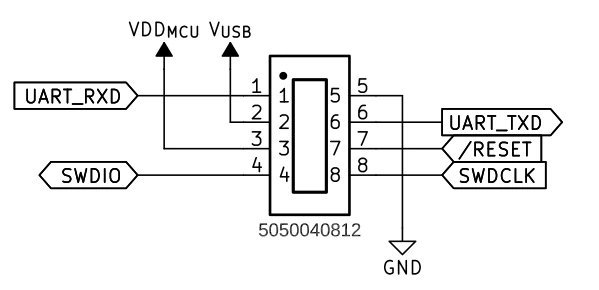
Asterix B2B connector pinout#
The “Core B2B v2” board has been designed as a companion programming board.
It is based on the Raspberry Pi Debug Probe.
Software for the Core B2B v2 board is available in the Core B2B v2 repository.
Below you can find a picture on how it is connected, and a list of its main features.
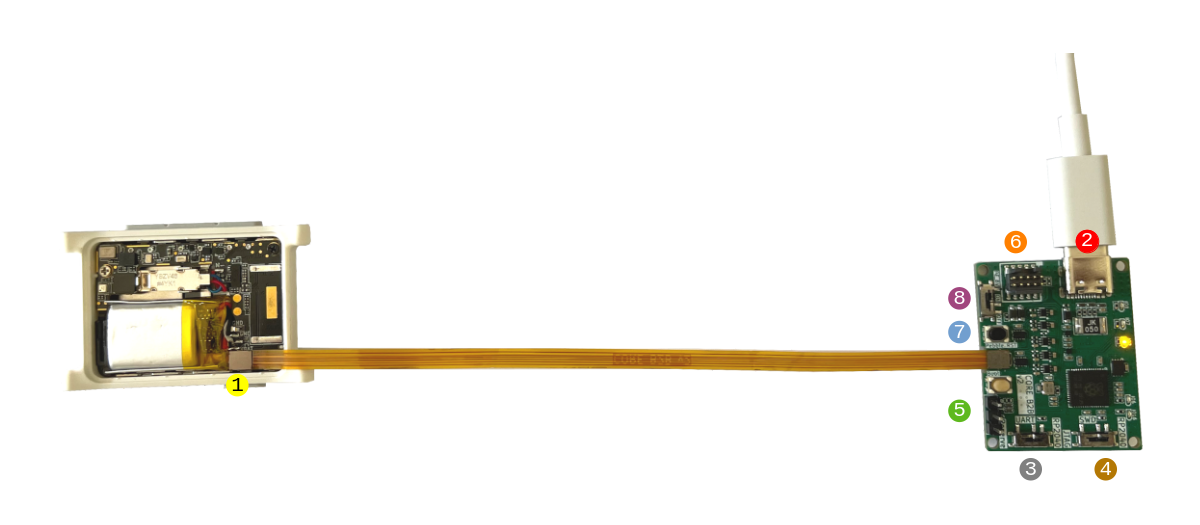
Asterix and Core B2B v2#
Warning
External connectors (SWD/UART) expose 1.8V signals. Do not use any adapter that does not operate at 1.8V, or there is a risk of damage!
Asterix B2B connector
USB connector
Powers the board
Provides VUSB
Exposes a CMSIS-DAP device and a virtual COM port
Debug UART routing
L: External connector (5)
R: Embedded virtual COM port (2)
SWD routing
L: External SWD connector (6)
R: Embedded CMSIS-DAP (2)
Debug UART pins
External SWD connector
MCU Reset
VUSB switch
L: connected
R: disconnected
Usage and tips#
After receiving your Firmware Dev Kit, please update the firmware on the board to the latest release.
When using the built-in programmer and USB-UART converter, make sure to place switches (3) and (4) to the right, as shown in the picture below. It is also recommended to provide VUSB while programming so that the watch is always programmable regardless of the battery level. For this to happen, place switch (8) to the left.
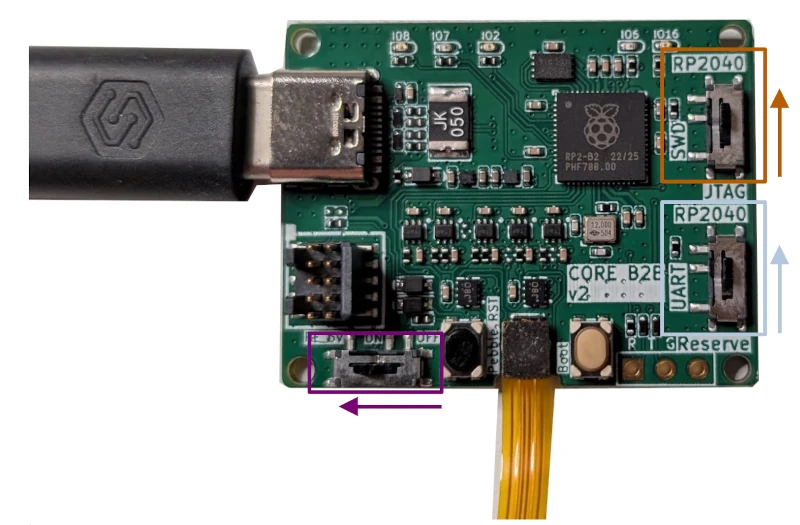
Correct orientation of the switches when using built-in programmer, USB-UART converter and powering VUSB#
Please make sure to connect the B2Bv2 board in the EXACT way detailed in this document. If you connect it in any other orientation, your watch will be rendered unusable. You have been warned.
If you are having trouble programming your watch, check the orientation of the switches. Sometimes they accidentally get switched to the wrong side during shipping.
If your serial console is showing text but not accepting input, then your connector is likely not seated correctly. Press to click it in more.